Spot On Performance
  • Products
    • SOP Materials
    • SOP Construction
    • SOP Carrier/Dispatch
    • SOP Driver
  • Industries
    • Frac Sand
    • Asphalt
    • Aggregates
    • Concrete
    • Oil & Gas
  • Resources
    • Training
    • Apps
    • E-Ticketing
    • Blog
  • Company
    • About Us
  • Login
  • Products
    • SOP Materials
    • SOP Construction
    • SOP Carrier/Dispatch
    • SOP Driver
  • Industries
    • Frac Sand
    • Asphalt
    • Aggregates
    • Concrete
    • Oil & Gas
  • Resources
    • Training
    • Apps
    • E-Ticketing
    • Blog
  • Company
    • About Us
  • Login
  • Products
    • SOP Materials
    • SOP Construction
    • SOP Carrier/Dispatch
    • SOP Driver
  • Industries
    • Frac Sand
    • Asphalt
    • Aggregates
    • Concrete
    • Oil & Gas
  • Resources
    • Training
    • Apps
    • E-Ticketing
    • Blog
  • Company
    • About Us
  • Login
  • Products
    • SOP Materials
    • SOP Construction
    • SOP Carrier/Dispatch
    • SOP Driver
  • Industries
    • Frac Sand
    • Asphalt
    • Aggregates
    • Concrete
    • Oil & Gas
  • Resources
    • Training
    • Apps
    • E-Ticketing
    • Blog
  • Company
    • About Us
  • Login

Getting Started

7
  • Notifications
  • Setting a Default Plant
  • Mobile Apps
  • Job Search
  • Navigating Work Shifts
  • SOP’s Dashboard
  • Accessing SOP

Administrators

11
  • Plant Setup
  • System Settings
  • Truck Management
  • Customers
  • Carrier Management
  • Driver Management
  • Project Owners
  • Inviting New Accounts
  • Inspection Firms
  • GPS Truck Tracking
  • GPS Setup

Managers

16
  • GPS Setup
  • GPS Truck Tracking
  • Load QC Reporting
  • Backhaul Scheduling
  • Job Setup and Details
  • Job Shift Settings
  • Job Access
  • Production Scheduling
  • Truck Dispatch
  • User Management
  • User Roles
  • Activity Report
  • Performance & Dwell Report
  • Time Report
  • Quality Control Report
  • System Reports

E-Ticketing

3
  • Notes and Pictures
  • Quality Control
  • E-Ticket Reporting

Plant Management

2
  • Dashboard
  • Plant Dashboard

Delivery Management

6
  • GPS Setup
  • GPS Truck Tracking
  • Location and Targets
  • Interactive Unloading
  • Truck Time Cards
  • Load Uses

Material Hauling

3
  • Material Haul Scheduling
  • Loading
  • Interactive Unloading

Drivers

9
  • Job Access
  • Time Cards
  • E-Tickets
  • Interactions
  • Check-In
  • Driver App Install
  • GPS Truck Tracking
  • GPS Setup
  • Driver Coins

Order Management

3
  • Orders
  • Creating an Order
  • Viewing & Editing Orders

E-Tickets & Reports

2
  • Ticket Search
  • Job Ticket Search
View Categories
  • Home
  • Training
  • Managers
  • Performance & Dwell Report

Performance & Dwell Report

Overview

When viewing a shift and accessing the Reports page, users can utilize the Performance and Dwell reports to obtain detailed information about load timing and scores.


Performance Report

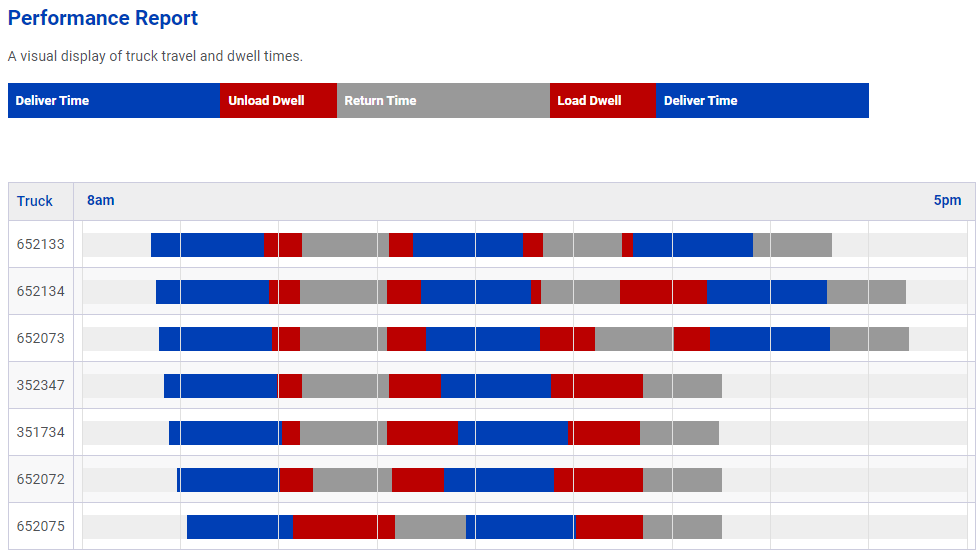
To access the Performance report, navigate to the reports section of a shift and click the ‘Performance’ button.

This report provides a comprehensive breakdown of the trip progression for each load. In cases where trucks have multiple loads, the bar representing the trip progression will repeat itself accordingly.

Dwell Report

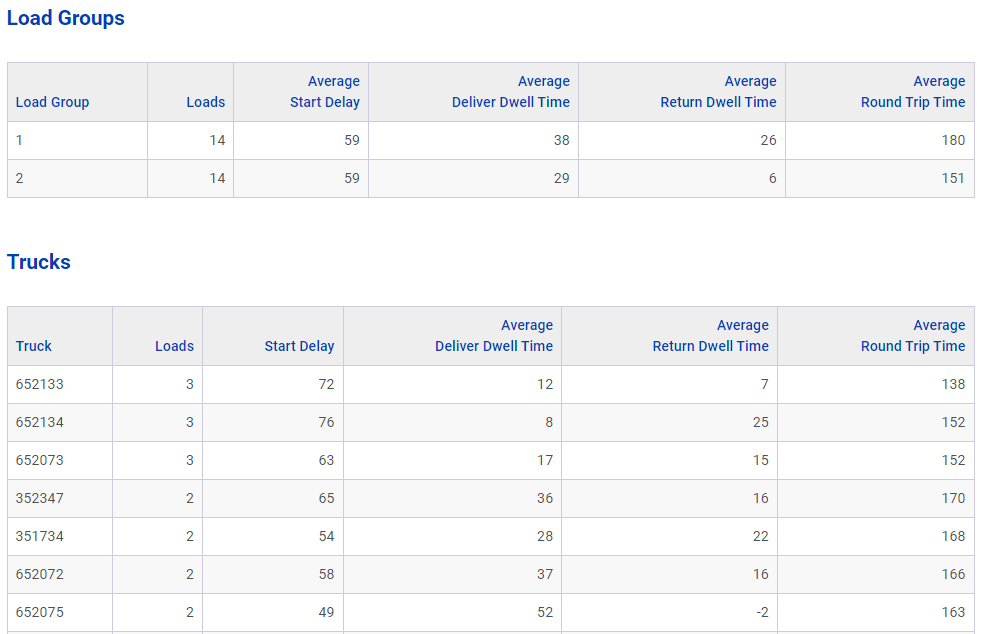
From the reports section of a shift, click the ‘Dwell’ button to get started.

 On this page, users can examine various details such as dwell time, start delay, and round trip times for each load. Additionally, when there are multiple loads assigned to a truck, a load group table summarizes the information into a single statistic for easy reference.
Updated on June 7, 2023

What are your Feelings

  • Happy
  • Normal
  • Sad

Share This Article :

  • Facebook
  • X
  • LinkedIn
  • Pinterest
Activity ReportTime Report
Table of Contents
  • Overview
  • Performance Report
  • Dwell Report

Subscribe to our Newsletter

Get notified of news and updates first.

    Porto App Landing © Copyright 2023. All Rights Reserved.